Showing posts with label coding. Show all posts

Wednesday, May 27, 2020

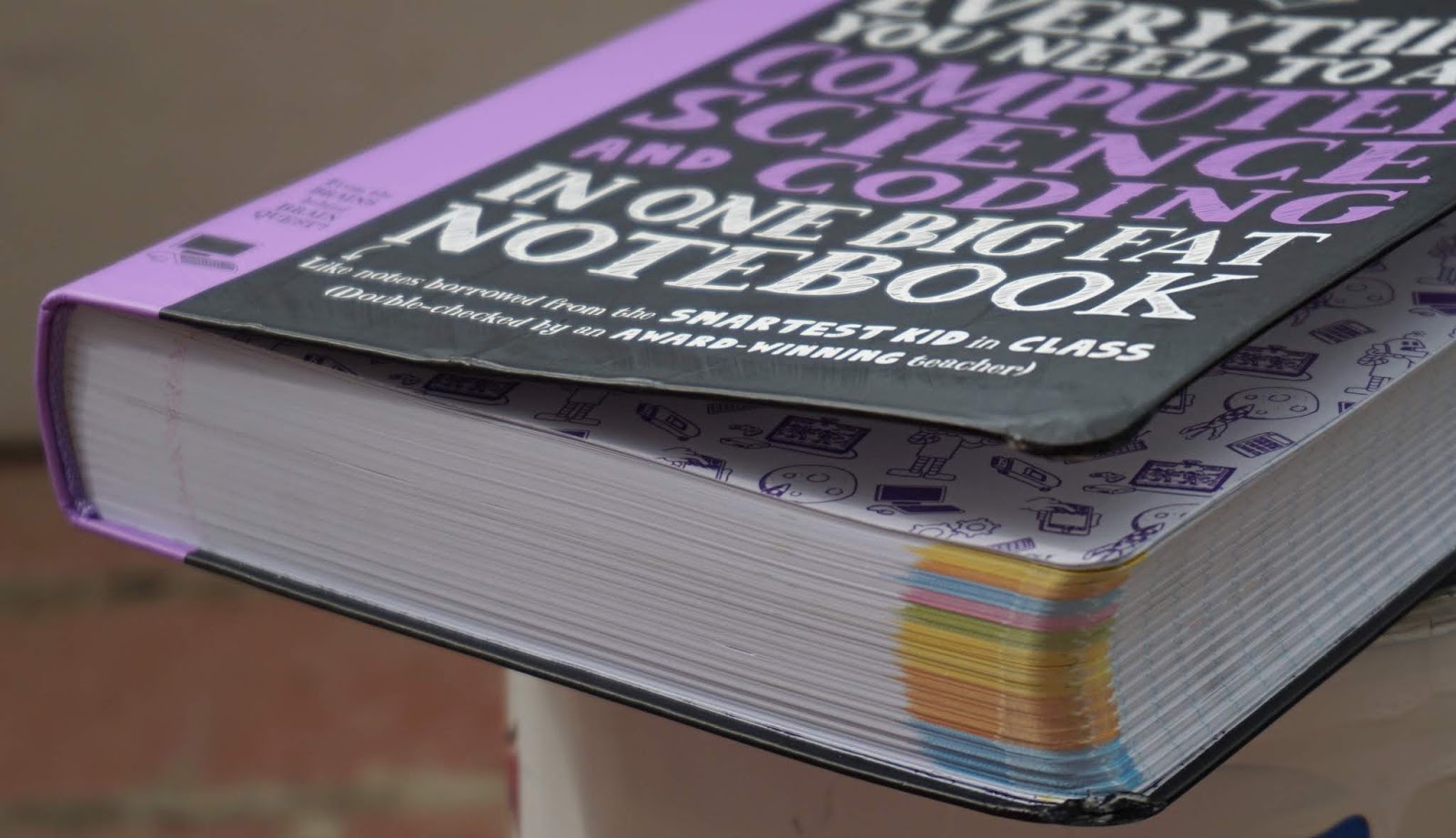
Computer Science and Coding Big Fat Notebook

Disclaimer: I received a FREE copy of this product through the HOMESCHOOL REVIEW CREW in exchange for my honest review. I was not required to write a positive review nor was I compensated in any other way.



My husband is an extremely tech-savvy guy, so it's no surprise that an interest in technology and its workings has passed on to our kids. When we get a review that focuses on computer learning, I usually think of my oldest child as he has a growing interest in various outlets such as coding, graphics software, 3D design, and the like. The only problem for him is that many books are geared toward beginners, like this book from Workman Publishing.

Thankfully though, I have another son who is following in his steps toward being a tech guru. I knew that Everything You Need to Ace Computer Science and Coding in One Big Fat Notebook would be a perfect option for him.


Workman Publishing was started in 1968 and has since grown to be the largest independently owned trade book publisher in the United States. They represent many well-known brands, including the best-selling Brain Quest line. The editors of those materials have created a new series called the Big Fat Notebooks. Each book acts an innovative study guide for a school subject: math, science, world history, American history, English language arts, and computer science and coding. They are designed to feel like the reader borrowed notes from the smartest student in class as there are highlighted portions, doodles, notes "taped" into the pages, and more all in a thick composition notebook format.   

Computer Science and Coding in One Big Fat Notebook is the newest Big Fat Notebook and teaches key concepts while covering the basics of computer science and the fundamentals of multiple coding languages.

  • Computer Systems
  • Data and Analysis
  • Software Engineering
  • Algorithms and Programming
  • Universal Programming Principles
  • Programming with Scratch
  • Programming in Python
  • Web Development


The Big Fat Notebooks are geared toward helping middle schoolers ace their classes by making the information easy-to-understand and visually appealing. Even though my son is in only second grade, I felt confident that he could use the book since he has had a bit of experience using Scratch after watching his big brother. I knew he would be excited to have his own book and be able to create fun projects for school.

I had him read the first chapter, "What Is Computer Science?," which talks about what a computer is, what it does, how they are used in our lives, and what kind of jobs and tasks rely on them. It also touches on data, analysis, networks, the internet, and the impact of computing.


After that, I allowed him to jump straight to the Scratch unit.  The book immediately drew him in with its realistic notebooking style. The first chapter explains that Scratch is a simple programming language to use (that's why our kids learn it young) and how it uses blocks to create scripts. It explains different aspects of the program and what each component is.

The second chapter of the unit (chapter 20 of the whole book), is when he really started to learn more about using the language. He learned about parameters, the glide block, and the pen block which he used to recreate a turtle from the book. The chapter also covers some of his favorite features like the sound blocks and look blocks.


The remaining chapters cover storing information in variables, performing calculations on values with operator, evaluating information with boolean blocks, understanding the difference between control blocks and event blocks, repeating with loops, using conditional blocks, cloning, making your own block functions, and more.

Some of the information he was already familiar with using, but other features were new. It has been so fun watching him work through this unit. Many times I've heard, "Mom! Come see what I made!" For the most part, he has been able to work through the steps on his own, but when he has had difficulty understanding, his big brother has been right there to help him. That is one of my favorite things about my kids learning at home.


Since my little guy is still years away from middle school, he's been slowly working through the book. But he has been working through it! That shows me that the material is laid out in a way that's easy for kids to understand. Not only that, but he likes it. The book is colorful and eye-catching and doesn't feel at all like a textbook.

Other things he will learn from the book include collecting and using information, designing computer systems, computational thinking, understanding Python, creating a basic web page with HTML, styling elements with CSS, and much more. There are 39 chapters and over 560 pages packed with computer science learning. There is a brief Check Your Knowledge section at the end of each chapter to review key concepts with the answers on the following page that my boy and I always work through together. There are also color-coded tabs at the bottom of the pages that make each unit easy to access and an index at the back to find specific terms.


Our book came in pretty rough shape. It was mailed in a regular shipping envelope and sustained damage. The cover is creased in multiple places and the corners are torn. My daughter even asked, "We got this used, right?"

While I love that the inside looks like study notes, I don't want the outside to look like it's been tossed in a locker all school year and repeatedly abused. 


Here's what my guy thought of his Big Fat Notebook:

"I like it! All of it!"

He asks to do his coding work first thing every day. For a boy who conveniently "forgets" to do his schoolwork and gets distracted often, that's saying a lot.


Everything You Need to Ace Computer Science and Coding in One Big Fat Notebook is a fantastic resource for kids who are interested in technology. It is engaging, written in simple terms, and entertaining. We like it so much that I can't wait to check out some of the other Big Fat Notebooks for the other subjects.

Using these study guides, you can be the smartest kid in class!


You can connect with Workman Publishing on the following social media sites:


You can read more reviews of this book on the Homeschool Review Crew blog.


Everything You Need to Ace Computer Science and Coding in One Big Fat Notebook {Workman Publishing Reviews}
Pin It

Wednesday, July 18, 2018

Code for Teens


My oldest (12 yrs) is very tech-minded. He loves any chance he gets to work with technology, so he was excited for a review that meant he got to work on the computer for school. And this isn't just any computer work; this is for coding, his passion. His desire is to pursue programming as a career one day. He has a good grasp of Scratch and Python and has dabbled in HTML. Software engineering is one of the fastest growing career paths and technology is constantly changing. I believe it's good to give him a well-rounded foundation in programming, so he will be better prepared for his future job, no matter which language he will need.

He had no previous experience with JavaScript, so Code for Teens: The Awesome Beginner's Guide to Programming (Volume 1) from Code for Teens seemed like the perfect starting place for him.   
   

Code for Teens was written by Jeremy Moritz in order to offer a multi-purpose coding course specifically for kids. Though there are many such options already available on the market, Jeremy found none that moved at a proper pace without overwhelming the teen. He created a resource that needs no additional guidance, explanation, or review from a knowledgeable teacher. His book contains everything a young teen needs to learn coding by himself.    

Not only is Code for Teens written at a child's pace, but written at a child's level, too. The conversational style is easy-to-follow. He speaks directly to the student in a likable manner with some humor weaved in. Important terms are in bold print. Sometimes the definitions accompany the text, but every one of those words and their definitions can also be found in the back of the book in the glossary section. The chapters are marked by strips of color on the edges of the pages for easily finding your way around. Original artwork illustrated by his wife, Christine, enhances the pages, as well. 


The beginning of the book contains an introduction to the student, not only to explain the purpose of the book, but also to spark some enthusiasm. Next is a letter to the parents. This section explains the value of coding and the benefits the child will receive from learning it. After the preliminaries, the teaching begins. Chapter one starts very simply by explaining what the student need to code, important terms and command keys, and then gets right into the first lines of code. 

One thing that I really liked in this chapter is the attention drawn to the error messages. The author tells the student to appreciate them because they're helpful in finding mistakes. Coding is very specific, so spotting the errors is vital. The book then directs the learner to make mistakes on purpose and walks him through the steps to understanding what is wrong and how to fix it.


As the book progresses, so does the difficulty of the code. The student will learn data types, comments, functions, operators, arrays, and so much more. Each chapter is filled with hands-on exercises to get the teen on the computer programming. Much of the book is filled with simple type-this-code throughout the text because that is how it is learned best, but each chapter ends with a DIY section, too. This do-it-yourself project gives the student an assignment in which he is required to write his own code. There are easier projects such as finding the average age of your family and creating a personal bio, but the more difficult activities require the student to solve problems such as bug issues in a video game and logging messages and creating functions for a hypothetical allergy.

Each chapter ends with a ton of review. There is a quiz, a list of key concepts, code drills, and an aggregate review section, in addition to the DIY project. All of the answers are found in the back of the book.  

My son had an easy time with the beginning of the book, because of his prior experience with coding. I was surprised at his knowledge when I verbally asked him the quiz questions. He kept telling me how similar JavaScript is to Python. He didn't understand as much as he thought he did though when he found difficulty with one of the DIY projects.He had to go back and look at the information a little more closely. Once he took the time to follow along in the book, he realized just how well-written the instructions are.


The teaching throughout the book is so conversationally written that it's like having a personal tutor sitting there to help you. The writing engages the reader so well, in fact, that I even opened the console and wrote me first code! Anyone who knows us knows that my husband is the tech geek in our home and that I have no desire to learn these things in such detail. But this book truly is that captivating and makes the information easy-to-understand.

This first volume is all about JavaScript, but the second book introduces HTML and CSS and shows how it all works together to create web pages and games. If you have a teen that is interested in programming, Code for Teens is a fantastic resource. 


You can find Code for Teens on their website and Facebook.


Please visit the Homeschool Review Crew blog to read more reviews of this book.


Crew Disclaimer
Pin It

Friday, May 4, 2018

CodeWizardsHQ


My oldest child, Jake, has a great interest in programming. I knew he would appreciate a live class  from CodeWizardsHQ to review. He got a coding book for Christmas, has borrowed a few others from the library, and has read instructional resources online. He can often be found programming on Scratch, Python, or his Raspberry Pi.

I personally don't understand any of that myself, but my techie husband does and he's able to help our son to some extent. Jake has a desire to pursue programming as a career though, so these coding classes for kids and homeschool computer programs would help him to succeed and truly understand coding at a professional level. 


CodeWizardsHQ generally focuses on 12-week courses in which they inspire students to have a passion for coding through fun and engaging projects. Occasionally though, they offer a one-time class. It is this one-time, one-hour class that we experienced.

Their approach to coding "combines the benefits of teacher-led instruction and the ease and convenience of online classrooms." Each class is taught live, so the student can see, hear, and interact with the instructor in real-time. Because each class has only 6-8 students, the instructor is able to give personal attention to each student and offer feedback, encouragement, and suggestions.


Their well-structured program and developmental curriculum have been designed by professionals with a passion for coding. Each class is challenging enough to keep students advancing toward mastery, but fun enough to keep them engaged. Students learn "real text coding, the logic, structure and practical applications of important programming languages." There are four courses a student can progress through, starting with the Introduction to Programming course and ending with an Internship Program with a nonprofit organization. By the end of the classes, a student will have the coding skills he needs for additional internships, scholarships, colleges, and jobs. 

Jake was excited for his class. Signing in was easy, and the instructor was immediately friendly and helpful. Because Jake is only 12 years old and this is a safe environment, this was his first experience with online chat. He was able to interact with the four other middle school and high school students that were in his class as they learned together.


This was the first class of first introductory course, so it was pretty basic. The student's project was to create a comic strip using HTML. There were various preset options they could choose to change the background, add a character, insert text, or include a picture. The project was based around copying these preset codes and inserting them into the template. 

I understand that this was just a first class, but there were some things that concerned me. For instance, if the students wanted to use an image that was not in the coding platform, they were encouraged to upload their own picture from an online search. There was no mention of copyright issues. This could potentially cause problems, for both the student and the company. Also, Jake didn't feel like he really learned anything as the whole class was simply copying and pasting. There was no instruction as to the format needed or what HTML even meant. I would assume these things would be addressed in later classes, but I cannot be sure.


Looking over their site, it seems like CodeWizardsHQ is a quality, structured coding education. It looks like the instructors are qualified and the projects are engaging, but I cannot get a true understanding of it with only one class. I can say that Jake enjoyed the class and would be interested in continuing with the course. 


You can connect with CodeWizardsHQ on the following social media sites:
Facebook Group (for parents whose kids are interested in coding)

You can read more reviews on the Homeschool Review Crew blog. 

Crew Disclaimer
Pin It