Showing posts with label math facts. Show all posts

Tuesday, April 5, 2016

Times Tales Review


Math seems to be one of those subjects that you either love or hate; there is no middle ground. My oldest, for instance, is one who experiences both feelings depending on the day. If he understands the concept, he tells me how much he loves math. If he's learning something new that pushes him mentally, he's convinced math is the worst thing in the world. I remember that learning multiplication was like a teeter-totter of emotions for him. Love, hate, love, hate, love . . . I didn't want my daughter to struggle with the I-hate-this feeling, but wanted to give her a good foundation in her multiplication facts. The Trigger Memory Co. has made a way to do just that. And to make it fun? Now that's just a bonus. Times Tales has changed the way we teach math facts.


Times Tales is a fun, new way to learn the upper times tables. By transforming the numbers into cute characters and creating stories with them, the multiplication products are easily and quickly memorized.

This animated program is divided into 2 parts, about 30 minutes each. The first part consists of the upper 3s and 4s tables (each number multiplied by 6, 7, 8, and 9) and the second part teaches the upper 6s, 7s, 8s, and 9s (again, each number multiplied by 6, 7, 8, 9).


1. Meet the Characters -- The first part the of video introduces the characters and the numbers they represent.  

  • Butterfly = 3
  • Chair = 4
  • Sixth Grade Class = 6
  • Mrs. Week (and Mr. Week) = 7
  • Mrs. Snowman (and Mr. Snowman) = 8
  • Treehouse = 9
2. Learn the Stories -- This is where stories are told and the math facts are taught. The multiplication problems are hidden in the simple stories.
3. Story Quiz -- The times tale are reiterated as the stories are reviewed. The students play beat the clock as they try to answer the questions before they show on the screen.

4. You're the Story Teller -- Pause the video, say the story, and then play the video again to see if they are correct. The program stresses that the stories must be said in the proper order, so there is no confusion as the facts are learned.
5. Practice Flashcards -- Part 5 teaches the students hidden multiplication problems using the characters in place of numbers. This helps the student to recall the story, and in turn, the answer.
6. Flashcards -- In the last portion, the times tables are drilled, but this time use typical flashcards with numbers, instead of characters. Students play beat the clock once again to give the answers.


I had intended to use this program with my (just-turned) 8-year-old daughter who had no previous experience with multiplication. Once the video started playing and the characters showed on the screen, one of her brothers joined her at the table. Before long, I had four children crowded around the computer, watching the Times Tales. After watching the first two parts of the program (Meet the Characters and Learn the Stories) one time, I heard the kids shout out the answers to the problems. After one time? Could it really work that well?

I looked over to see a snowman standing on a chair. It made no sense to me, but I heard my girl say enthusiastically, "32!" 
Mrs. Snowman (8) stood on a Chair (4) to reach her 3 buttons and 2 mittens.   

To me, it seemed confusing. Surely this story couldn't be easier than simply memorizing 8x4=32. Time and time again though (no pun intended, ha), my daughter gave the correct answer. She hesitated on some, but I was shocked to see how many she could answer on the first day.


Three PDF files are included with the videos. There is a file with printables that correspond to part 1, a file to accompany part 2, and a file with the answer key. The printables for both parts are similar in format and include a crossword puzzle; flashcards with the characters; flashcards with the numbers; division flashcards with a number and a character; division flashcards with numbers; a practice test;  a test; and buildable roll'em cube game. 

Not only did my daughter love watching the videos, she begged to do her papers, too. The printables are nothing fancy, just simple review pages to help retain the knowledge. I think she was so excited to complete them because she knew the answers and was proud of herself. The older kids and I played variations of the games with the cubes, like if we answered the question correctly, we got that many points added to our total. I also had her quiz against her big brother using the flashcards, and she even won a few rounds!

  
My oldest is still quicker with his multiplication facts, most of the time, but he did tell me, "I wish I had this when I was learning." The animated characters along with the stories have made learning the facts so easy.  My daughter can answer all the multiplication facts quickly now. She is even learning their division counterparts, though she does struggle with those a little. I enjoy hearing my little boys recite the tables, too, and I haven't reviewed them at all, just allowed them to watch the videos.

My daughter knows that I always ask for the kids' opinions when I'm writing my reviews. Before I even asked, she said to me, "If I have to tell you anything that I liked about it, it's the whole entire thing."

The best thing I can say about Times Tales is that it works, it works quickly, and the kids love it.


You can see for yourself how the program works with a free trial of the 9s family. You can connect with The Trigger Memory Co. on Facebook to learn more, too.


If you'd like to read more reviews of this product, please visit the Schoolhouse Review Crew blog.

Crew Disclaimer
Pin It

Thursday, March 19, 2015

GPA Learn


Math is a subject that is used in everyday life, whether it's for your job, in your home, or at the store. That's why it's so important to have a good grasp of understanding. Since math builds on itself, I want to make sure that my kids have a solid foundation now, so that future learning of more difficult concepts is made easier. I was thrilled we were given the privilege to review a subscription to GPA LEARN. 

GPALOVEMATH is an online math program for students in kindergarten-5th grade. The lessons are taught by animated characters, or "learning coaches." Each grade has over 150 lessons and more than 10,000 practice problems. By doing 4-5 lessons a week, a student can complete an entire grade in 10 months.


Each grade level has its own learning coach. We're currently using kindergarten, 2nd grade, and 4th grade. The kindergarten level is led by Detective Digits. Every time Zac logs in, his coach says, "Hello, problem solver pal," which makes him feel important. Second grade is coached by an island girl named Adirehs. Fourth graders follow a wise owl name Pemdas on his question for knowledge. My kids were immediately pulled in by the cute videos that introduce the coaches. They were disappointed though once the regular lesson videos started and they were narrated by a robotic voice, instead of the voice from the introduction.       

Each grade has 3 different paths of learning to follow: green, purple, and blue. Each path focuses on a specific math concept. You can set up the program to follow the recommended order of learning in which the student needs to complete the next lesson on the path before another will open or you can open up the entire grade level in which the student can complete any lesson from the topics.


The lessons include instruction, practice questions, and a quiz. The instruction portion is narrated by the learning coach, while the practice and quiz sections are to be read by the student. A child can click on the text though, and the coach will read the directions to him. My kindergartener took advantage of that feature a lot.  

Completing lessons also earns the student points and rewards. You can custom create the list of rewards or use the ones provided, like choosing what is for dinner, your parent completing a chore, and staying up 30 minutes later.

An email is sent to the parent after each lesson is completed. The email lets you know absolutely everything you might want to know: the title, the time the lesson was started, the time it ended, the total time it took, the percentage of the instruction completed, the percentage of the practice questions completed, and the number of questions answered correctly on the quiz. It also lets you know if a lesson needs to be completed again because the student got too many problems wrong. I, personally, found these emails a bit too much. With 3 kids working through this and completing multiple lessons a day, I get many emails about it. I would like there to be an option to turn it off. However, I do appreciate the weekly digest email. While it doesn't give as much detail, I find that it lists the aspects that are important to me: the number of lessons completed that week, the titles, the duration of the lesson, the outcome (closed before finishing, excellent, try again, etc.), the percentage completed of both the instruction and practice, and how well they did on the quiz. I can quickly look at that list and see exactly where my children are excelling or struggling. 


Each school day, the kids have to do at least 1 lesson. Oftentimes, they will more because they enjoy it. I allow them to decide if they want to listen to the instructional video or skip right to the quiz. If they head right to the quiz, I require them to complete 2 lessons. For instance, Zac is 5 and working through the kindergarten level. The beginning lessons focus on number recognition, shapes, and beginning addition. He has known these things for years. Instead of opening all the topics and picking up where it would be challenging for him, I decided to let him speed through the easier portions. If he, or one of the other kids, decides to listen to the instructional video before completing the practice and quiz questions, then he is required to complete only 1 lesson.

This is what my kids had to say about the program:

Jake (9): "I like that you can win things and that there's different people. I like that there's different paths." 

Alyssa (6): "I like that there's different characters to teach the lessons. I like some of the lessons. And I really like the videos."

Zac (5): "I like that it's short (lesson). I like that it's like a super agent! I like that I can skip to the quiz. Sometimes I don't like skipping to the quiz, because then I have to do two (lessons)."

This program is working very well in our house. The kids complete their lessons without complaint (most of the time!). I like that they can choose whether or not to listen to the instructional video. It's there if they need it, but doesn't make them crabby if they don't. The weekly email lets me see exactly how they're doing and what they're doing. We will continue to use this program. 


You can connect with GPA LEARN on the following social media sites:


You can read more reviews of this program on the Schoolhouse Review Crew blog.

Crew Disclaimer
Pin It

Wednesday, August 27, 2014

UberSmart Math Facts


Math is one of those subjects where it's easy to see how it applies to everyday life. I can remember being in school and listening to my peers ask in various classes, "Why do I need to learn this? When am I ever going to use this?" Math is not like that. Ok, maybe some math is not super essential to daily life--I cannot remember the last time I used the calculus knowledge I learned in high school--but regardless, math as a whole is vital to know. Whether you're doing something as simple as shopping at the store or following a recipe or doing something more difficult like a career in engineering or as a computer programmer, you're using math. My kids enjoy math, as far as using it to accomplish something, and they're very good at it. They're not overly thrilled with sitting and performing math equations though. Since we hadn't drilled simple math facts in a while, I noticed that their response times had lengthened. I was please to receive a program from UberSmart Software to review.

UberSmart Math Facts is a Windows-based (XP, Vista, 7, and 8) downloadable software program that helps teach and review basic addition, subtraction, multiplication, and division facts. The idea came about when David Kocur began looking for a flash card program for his kids. After searching, downloading, and reviewing dozens of programs for hours, he couldn't find one that he truly liked. It was then that he started to write his own, and UberSmart Math Facts was born. It worked so well with his own daughters that he decided to offer it to other families as well.

The program teaches math skills using dot cards, flash cards, and keyboard entry. Addition and subtraction facts are reviewed through the 9s family, while multiplication and division are practiced through the 20s. 


As soon as you download the software, you are able to make profiles for up to 8 students. I used this with Jake (8) and Alyssa (6). The each know how to get to their own profiles and can pick up practicing where they left off without any help from me. I can easily customize it to fit their needs. There are sections labeled Learn, Practice, Test, and Compete for the students. 

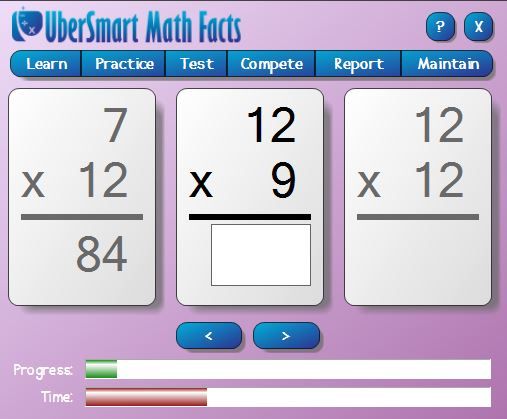
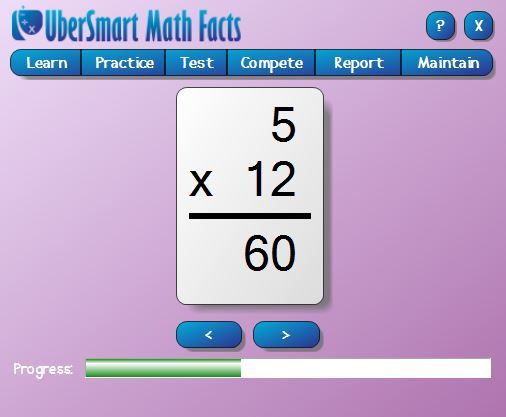
In the Learn section, the student receives an equation (dot cards for beginners or flash cards for intermediates) on the screen and can answer it, either audibly or mentally, before clicking the show button to display the correct answer on cards. This option gives the student the ability to learn the facts without the pressure of answering correctly and finding the numbers on the keyboard within a given time. This is Alyssa's preferred way of practicing.     

The Practice tab has 3 options: dot cards, keyboard entry, and flash cards. Here, the student can practice finding the correct answer by clicking the correct card to answer the problem (dot card), typing in the given number (keyboard entry), or typing the answer to the equation (flash card). This is a timed section. If the student does not answer correctly within the proper time, the answer will show on the screen. 

The Test option is Jake's favorite. After learning and practicing, the student is given the opportunity to showcase what he knows. It is much like the practice part, except once all the problems of an operation and family are answered correctly in a round, it is marked as mastered. Jake loves working hard to master the individual families. Seeing that Mastered! acknowledgement gives him a sense of pride.

The Compete section allows the student to test their skills against other users around the world. You can choose who is competing: elementary, middle school, high school, or adult. When the series of questions on the flash cards is completed, the score and rank is shown on the screen.

 
The final two tabs, Report and Maintain, are for the parent/teacher. This is where I can see each child's progress or adjust things accordingly. For instance, for Alyssa, I've changed her seconds per problem from the suggested 4 seconds to 6 seconds because she was getting too frustrated if she couldn't answer in the appropriate time. She's my little perfectionist. It was too-overwhelming to her to get the problems wrong because she was running out of time to remember the answer, find the numbers on the keyboard, and enter them all before the 4 seconds were up and the answer was displayed on the screen. Once she'd get 1 or 2 wrong, she'd lose interest and focus. Once she becomes more familiar with it, I will change it back to the 4 seconds to increase her response time. For now, I love having the option to adjust it according to our needs. She's currently working on her addition skills, whereas Jake has mastered all the subtraction families and is working his way through multiplication mastering those as well. 

When we first started using this program, Jake, especially, was a little intimidated because he thought it would be too difficult to learn (or in many cases recall) the facts. Like I said in the beginning, his response time had slowed down drastically. Almost immediately though, even he saw major improvements in his skills. Having instant results drove him to try even harder to succeed. They each practice their facts for about 10 minutes a day 4 days a week. I've been very pleased with what they are learning and remembering. The program is not a flashy, fun game, but a program that is right-to-the-point and streamlined. Most importantly, it's a program that works. 

 
UberSmart Math Facts costs $24.95 and is available for instant download. It's recommended for grades K-6, but can easily be used for anyone wanting to brush-up on their math facts. The software license can be used on all the computers in the home and for up to 8 users. 

Personally, I'm glad to have this program for my family to use.


If you'd like to see how other families used this program, head to the Schoolhouse Review Crew blog to read more reviews.


Crew Disclaimer
Pin It