Showing posts with label app. Show all posts

Thursday, April 26, 2018

Planet 316


Two of my kids' favorite types of reviews are books and apps. When we're able to combine the two it's super exciting, and that's just what happened this time with Planet 316 and Worthy Kids/Ideals with their Planet 316 Story Bible and the companion Planet 316 Story Bible App. My kids were thrilled to receive the Story Bible and eagerly flipped through its pages. My daughter read a couple of the stories to her little brothers and soon the other boys wandered over to admire the brightly colored pages. 

It wasn't until the next day that the real surprise came. I handed them the tablet and they saw the pictures come to life.

     
The book is hardcover with thick, glossy pages. The illustrations are brightly-colored and whimsical and fill most of the pages, overlaying the text in empty spaces like the sky, walls, and ground. The book includes over 100 stories of the Bible starting with Creation in the Old Testament and ending with The Return of Jesus in the New. While the accounts are biblically accurate, they are told in a kid-friendly, story-telling way. Most of the stories are concise and fill a two-page spread, but there are a handful that are longer, such as the story of Ruth, Noah and the Flood, Jacob and Esau, Joseph Saves His Family, and The Last Supper, among others. With over 100 events of the Bible referenced, the common stories are included, for sure, along with some that may not be quite as well-known--Israel Asks for a King, The Capture of Jerusalem, Nehemiah Rebuilds the Wall, and more.

The applicable Bible reference is listed under each title. You can read the actual accounts to glean additional information or use it as a tool for older kids.


The Story Bible is a beautiful book in itself, but the augmented reality adds a whole new level of enjoyment. You simply download the free app, scan a page, and watch the stories come alive as the pictures pop off the page. There is music and sound effects, and the experience is enhanced more as you interact with the app by touching various pictures and listen to the characters talk and animals make their sounds. You can watch a ship getting tossed in a raging sea, the smells of Jacob's stew wafting to Esau, Samuel's oil pouring as he anoints David as king, Elijah's offering getting consumed by fire from Heaven, and a dove descending on Jesus as He was baptized.  

The Planet 316 Story Bible and the companion Planet 316 Story Bible App really is a neat combination. Using the app can be a bit finicky at times, especially for little ones. Juggling your device along with trying to keep the book open without the pages turning can be complicated. It would be beneficial to make the Story Bible spiral-bound to ensure the pages don't flip. My little guys enjoy watching the augmented reality, but they need help using it.


The Story Bible book is a wonderful resource and is a treasure to own. The stories are short, cover the facts, and are perfect for little ones. They can be used at bedtime, Bible classes, or just time together. The free augmented reality app is so fun, but really, it is just an additional bonus as the book itself is worth the purchase.

This is a book we will enjoy for many years. 


You can watch the app in action here:


You can connect with Planet 316 on the following social media sites:

You can read more reviews about Planet 316 and Worthy Kids/Ideals on the Homeschool Review Crew blog.


Crew Disclaimer
Pin It

Monday, August 21, 2017

Phonics Museum App


Our family loves the Veritas Press Bible programs, so when we had the opportunity to review for the company again, I was excited. They offer materials for much more than Bible classes though, and this time, we we've been learning with their new Phonics Museum App.

Veritas Press was created by Marlin and Laurie Detweiler as a way to give their own children a classical education. After their curricula worked so well for their family, they wanted to make it available to other like-minded parents, as well. Since then, the company has grown to offer full curriculum, a publishing company, an online classical Christian academy, and two classical Christian schools. 
   

The Phonics Museum App is a multi-sensory program that teaches kids to read in a fun, engaging way. The student joins William and Wendy on an adventure through an art museum. Percival, a walking-talking suit of armor guides and encourages them as they look at the paintings, learn their letters, and discover that art can be exciting. They are then introduced to Miss Biddle, the quirky museum curator, as she leads the lessons. She's animated during some of the games and activities, but "comes to life" as she teaches the lessons to the student. Like the other materials from Veritas Press, this app follows the Classical Approach of learning, and not only teaches letters and sounds, but includes bit of information about artists and their works, inventions, history, nature, and more. 

The app was designed for early-readers in the 3-7 year age range, so it contains over 900 games, videos, interactions, real teaching, and memory songs to keep little ones engaged. A typical lesson has around 11 stages.  It always starts and ends with a video and has other activities throughout. For example, it might follow this format: video, song, video, game, video, game, video, game, video, game, video. A student must complete each stage of the lesson before he can move to the next, and he can see what each lesson contains by looking at the numbered easels with the appropriate icons. Sometimes the videos are simply Miss Biddle announcing the next activity, but mostly they are filled with teaching and silliness.  


The Phonics Museum believes in "edutainment," meaning games and learning collide and children don't even realize it. That's why there are 22 games that not only will the student enjoy, but also will learn to read while playing them. The games reinforce the learning by encouraging the student to recognize the individual letters--both upper and lower case along with both printed and written versions--and their sounds. The games are simple, but cute. There is a chipmunk that eats nuts, a frog that catches flies with his tongue, birds that happily splash in a bird bath, a catapult that launches paintballs that decorate the castle, and many more.  

One thing that I appreciate about the teaching is that for the games that focus on the sounds, there is a slight emphasis on the specific letter that is being reviewed. For example, during an M game, the student is supposed to touch the sarcophagus when Miss Biddle says the words that begin with the M sound. Mmustache. Boy. Penny. Mmoose. There is that slight emphasis on the /m/ to trigger the sound for the student. It is not overly done and the student himself might not even recognize it, but subtly it helps.   


My kindergartner is learning to read, so this app came at the perfect time. He loves watching the videos, playing the games, and reading the simple books. He adores Miss Biddle. Seriously, she must be the cutest teacher ever with her bold dress covered in letters, ribbons in her hair, her quirkiness, and her charming personality. She's a bit like Miss Frizzle from The Magic School Bus, but not quite as eccentric and without the transforming bus. Many times I catch even my older kids watching the videos and laughing at the silliness. 

The museum contains 10 floors of interactive fun. The paintings come alive, the characters are silly, and the whole experience is fun. Most importantly though, it helps kids learn their letters and sounds--and ultimately how to put those together to make words--with a solid phonics-based program. I'm excited to watch my little one learn and explore with the Phonics Museum.  


The Phonics Museum App is available through iTunes. It is a complete curriculum on its own, but since it is a spin-off of the physical version, it can also be used as a complimentary aid. If you'd like to see the app in action, there is an informational video on the website.


You can connect with Veritas Press on the following social media sites:


You can read more reviews of this app on the Homeschool Review Crew blog.


Crew Disclaimer
Pin It

Friday, July 29, 2016

Orphs of the Woodlands

Our latest review has been a fun one! Our summer school schedule is pretty light and includes reading every day with a few learning-filled activities added in. My philosophy for our family is that schooling is a way of life, meaning that we look for the learning opportunities in everything we do. The kids are especially happy when I tell them that we're watching a movie on TV or playing a game on the iPad for "school." 
  
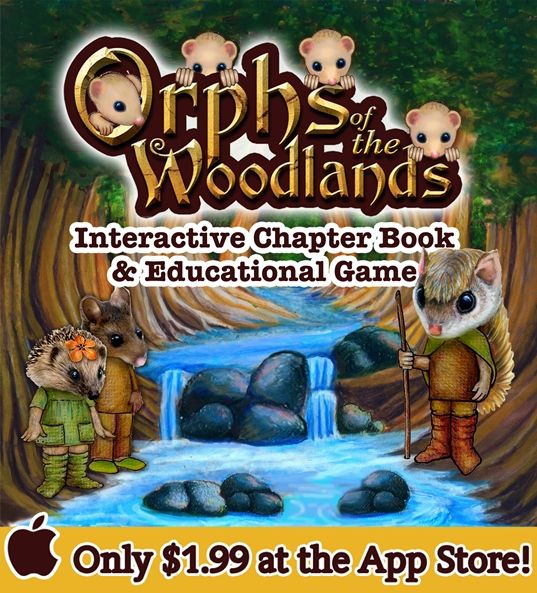
Orphs of the Woodlands at Tangletree falls in that latter category. This app from Star Toaster is an 122-page, interactive book that can be used on an iPhone, iPad, or iPod Touch running iOS 8.4 or later. It's great for ages 7+ and is a good transition to chapter books. 


Along with encouraging reading and improving comprehension, this app teaches much more.

  • math
  • thinking skills
  • vocabulary
  • science
  • grammar
  • the arts
  • character
  • life skills

The story follows Abba, a flying squirrel from Hoggoh Hollow. There was a terrible storm, causing the dam to break and flood his home and the entire hollow. All the other critters are missing except 6 orphans, or orphs, from the Woodlands. It is up to Abba to care for the orphs, which include 4 babies, all while gathering supplies and looking for his father. He travels all over the Woodlands to complete his tasks. 


In order to for Abba to buy the necessary supplies, he must complete jobs by helping other critters. He visits many occupations in Stumptown.

  • Beaver Builders: This section reviews math concepts, like counting by 100s; tally marks, fact families, etc..
  • Woodland Watchers: These jobs encourage thinking skills including paying attention and memory tips.
  • Woodland Scurrier: This is where the vocabulary practice is found and focuses on compound words, homonyms, definitions, and more.
  • Brainstormers Inc.: This science section contains videos and information about predicting weather, pulleys, animals, and other things from the book.
  • Pinecone Publishers: These grammar exercises include similes, nouns, and types of sentences.
  • Gopher Gifts & Supplies: The arts encourages impressionism through paintings.
  • Cricket Cards-- Some of the character traits highlighted in this section include your life speaks, be patient during trials, and you write your history.
  • Critter Cafe: These jobs teach life skills about nutrition through information about nuts and blueberries.


My kids absolutely loved playing this! My daughter (8 years) started as soon as I set up the game. She loves to read and was excited to see what the game was about. She has a soft spot for babies and felt bad for the little orphs. She couldn't wait to earn enough stars to purchase each new supply. At first, she was confused by some of the questions asked in the jobs areas, because the story didn't mention them. I showed her how all that information was in the job training section before each task. She was able to figure out everything on her own after that.

My son (10 years), on the other hand, was reluctant to try the game. His sister had completed the entire game before I finally told him that he had to play it. After the first day, he said, "Wow! This is so much better than I expected!" By the second day, he had finished the whole thing. He is a fast reader, but he also skipped all the job training sections and completed the tasks either by prior knowledge or guessing.

After they enjoyed it so much, I created myself an account and played too. The chapters are short and include many rich vocab words. The game is colorful and allows you to earn rewards along the way and keep your attention. It covers a wide range of subjects without feeling overwhelming.


This is what the kiddos had to say about it:

"I loved it. I liked reading and answering questions. I learned that frogs and toads croaked loud and long before it rains."

"It was pretty cool! I like that when you answer questions you earn stars to get stuff for your orphs. I like that they came up with so many backwards and forwards names like Hattah, Hoggoh, and Stots."


If you're looking for a way to encourage the love of reading, increase reading comprehension, and teach other subjects in fun way, Ophs of the Woodlands is a great option. My kids are eagerly awaiting the next story.


You can connect with Star Toaster on the following social media sites:


If you'd like to read more reviews of this app from other homeschoolers, please visit the Schoolhouse Review Crew blog.


Crew Disclaimer
Pin It

Tuesday, September 1, 2015

Dig-It! Games Review


We're year-round homeschoolers, and while summertime means that our workload is light and our schedule is flexible, the kids know that they have some sort of learning activity each day. It's exciting though when I tell them, "You have to play a game today." And when that game is played on the iPad or the computer? Well, that's a real treat.

Dig-It! Games is a company that focuses on game-based learning. In 2005, Suzi Wilczynski, founder, began to create fun, interactive learning experiences for middle school students by using her education and archaeology background. Not only are children naturally drawn to fun and games, but these games have "the potential to enhance learning by encouraging persistence, valuing effort over rote performance, and rewarding success without punishing failure." Depending on the game, they also learn important facts along the way. We've been learning the last several weeks by playing Roman Town (iOS App) and Mayan Mysteries (Online Game).


Roman Town is set in the ancient city of Pompeii. It is your job to help catch Ladrone, a master thief, by using strategic thinking, spatial reasoning, memory, logic, math skills, and problem solving. On your quest through the city, you play game with people you meet along the way. If you win the game, they give you a clue to help solve the case. 

Along with learning facts about Pompeii, you'll also learn about Roman life, experience ancient Roman games, and play 35 unique puzzles. The game teaches social studies, math, and literacy skills.


Jake, my 9-year-old, tested this app for me. He was thrilled to play the games and find the clues. Had I not put a limit on his game time, he probably would have completed the entire game in one sitting!
There were a couple times when he asked for my help (like the Roman numerals game), but otherwise played it by himself.


Mayan Mysteries is an online game in which Ladrone is back on the loose. You along with Professor Alex Quinn, Fiona, and Charlie make Team Q and try to figure out who is digging up Maya sites, looking for ancient artifacts. On your mission to save the mythical city of Ich'aak from looters, you'll discover 7 Maya sites and play more than 25 challenging puzzles.

The game teaches skills in social studies, math, language arts, geography, critical thinking, and reading enrichment. It is historically accurate, aligned to National Standards, and offers built-in assessments.

Since this game is best for grades 5-9, Jake played this one, too. He's actually a tad young for this, and it showed in both his understanding and enjoyment of it. There is a lot of information involved. You can either read the text yourself or choose the option to allow the characters to speak aloud to you. If Jake read it, he lost interest; if he listened, he stopped paying attention. The game is very fact-heavy. That can be a good thing for learning, but it just frustrated him. Every day after playing for a while, he'd ask, "Can I be done now?" It was a very different experience from Roman Town.


This conversation sums up his feelings about the games:

Me: What did you like about the Mayan game?

Jake: Nothing really. There were too many quizzes and so much information that you needed to remember.

Me: So, it didn't really feel like a game?

Jake: Not at all.

Me: What did you think about the Roman game?

Jake: Oh, that one was awesome! That had a lot of fun games.


I was in contact with customer support several times because of both a game-related issue and a user-caused issue. Each time, the service was prompt, helpful, and extremely understanding. I was very pleased and confident in the company.

Both games are full of historical facts and bring a fun element to learning. Jake might appreciate Mayan Mysteries as he gets older, but his 9-year-old self loves Roman Town.


You can connect with Dig-It! Games on the following social media sites:


If you'd like to see how other homeschool families used these games, you can read more reviews on the Schoolhouse Review Crew blog. 


Crew Disclaimer
Pin It

Tuesday, May 7, 2013

Phonics and Readng with McGuffey App


My kids love using the iPad, and I love giving them educational apps to use. That's why I was excited to review Phonics and Reading with McGuffey from LiteracySoft.

The app is based on McGuffey's Eclectic Primer Revised Edition, the most successful education textbook of all time. The 53 lessons allow the student to learn at his own pace and gives him the confidence he needs to read at a first grade level.


The app is designed to accomplish the following:
  •  Ensure no expert phonics supervisor is needed for students to gain maximum value from the lessons
  • Work for any literacy level 
  • Act as your own personalized tutor, except in a computer 
  • Let students set their own pace, repeating or slowing down lessons as much as they like 
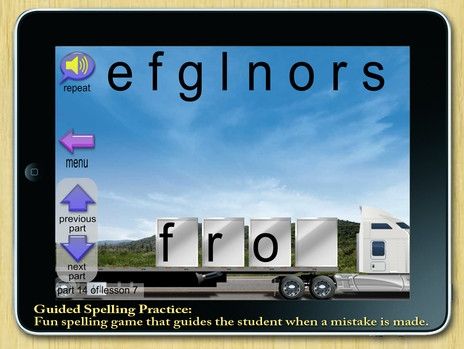
  • Guide your student step-by-step through reading and spelling practice 
  • Provide multi-sense learning including sound, vision, and motion to appeal to a wide variety of learning styles 
  • Utilize the power of synthetic phonics – the dyslexia-busting learning technique 
  • Be simple and easy to use for students at any level

I downloaded it to the iPad (also available for PC) and handed it to Alyssa, my 5-year-old. The set-up was easy. She chose a spot on the user screen and typed in her name. From there, she started the lesson. The app is designed to be the teacher, so my presence was not really needed. I sat with her as she completed the first few lessons, but she often went off by herself after that. (Though that was because she was trying to get away from her noisy brothers!) 

   
I really have mixed feelings about this app. For one thing, when it gives the sound of r in lesson one, instead of saying a true r sound, he says "ruh." It does the same thing with p, b, and g also. Alyssa used to pronounce the sounds correctly when she was sounding out words, but I've noticed her adding that "uh" to the end of the letter. 

Another pronunciation that I don't like is the word a. In this case, the word should be pronounced "uh," but it is said as a long a (ay) sound. 

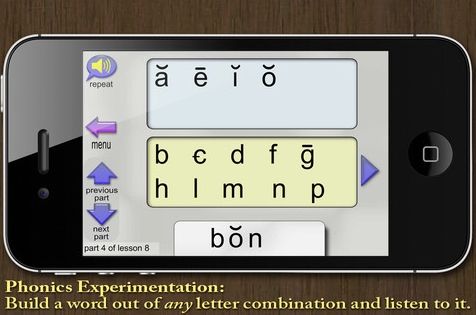
One more thing, and this may just be me being picky, but I'm a little undecided about the phonics blender section in the levels. While Alyssa (and her two brothers) loves switching the letters to make words, I'm not so sure it's helping with the spelling of real words. For instance, since the McGuffey Primer teaches the z sound of s (like in has) before it teaches the typical s sound (like in sat) or before it teaches the z sound, the app teaches it that way as well. So, as the kids were playing around, Alyssa decided to spell Zac's name since when she touched the s, it sounded like z. She wrote sac, but it pronounced it as Zac. Does that make sense? They were able to make many real (and silly) words as the lessons went on, but many times it was not as they were truly spelled. One of them would say, "Look, Mom, I made _____!" And though that's what the voice said aloud, that's not actually what they spelled. For instance, pal would be pronounced as pale because they chose the ā, mon is said as moon, rum becomes room because of the ū, and so on.


But there are some good points that I really like, too. For one thing, it matches up to the McGuffey Primer. We've used some of the McGuffey books with our oldest and now I can use the Primer right along with the app to reinforce what Alyssa is learning. And what's even better is that she likes using the app and even asks if she can do it! Even though little Zachy is only 3, he likes "playing" it, too. They always laugh at the silly little animated graphics and really enjoy making words in the phonics blender. While there are aspects that I don't like, the two of them are learning from it. I have seen an improvement in Alyssa's reading.


The full version of Phonics and Reading with McGuffey costs $19.99. You can also try the lite version or the first 10 lessons on the PC for free and download a free copy of McGuffey's Primer in color to aid in the lessons.


Want to see what other families thought about this app? You can head over and read more reviews from the Schoolhouse Review Crew.


Pin It

Wednesday, June 6, 2012

Sentence Structure Fun

We have had so much fun building sentences lately! We've been playing learning sentence structure on the iPad with Rainbow Sentences from Mobile Education Tools. 


 According to their description, 
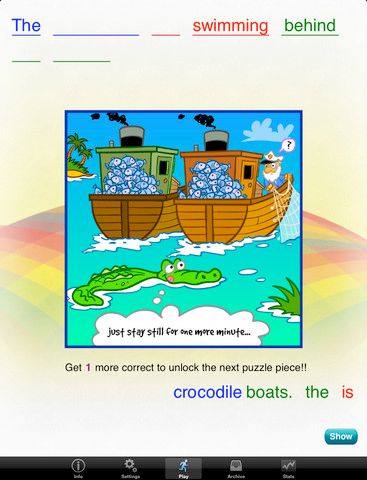
"Rainbow Sentences is designed to help students improve their ability to construct grammatically correct sentences by using color coded visual cues. The who, what, where, and why parts of sentences are color coded to help students recognize and understand how combinations of these parts create basic sentence structure."

The easiest level starts with 2 color-coded groups of words. The student drags each group to its corresponding color line. There are many options to increase the difficulty, such as lengthening the sentence, separating the groups of words into single words, un-coloring the lines, and un-coloring the words. The hardest level contains 10 or more single words, all black, and black word lines. 


After the student finishes, the sentence is read back to him. He also has the opportunity to record the sentence and hear his own recording played back. This was my kids favorite part. After playing through a few sentences, Jake (6 yr) said, "I want to hear the boy say it." He had no idea that he was hearing his own voice! He wouldn't even believe me that it was him until I had him record something funny instead of the sentence. Now, every time he and Alyssa (4 yr) play it, they record such silly things along with the actual sentence. There is always much giggling. They have fun while learning. Is that allowed???

The student also earns puzzle pieces as he progresses. Jake likes figuring out what the picture is with only a piece or two. He also likes showing his newborn baby brother the colorful pictures and recording him silly messages, like the one where he goo-goo gaa-gaa-ed then inform me, "I don't think he understood."

The app costs $7.99 and is recommended for ages 3-10. Both my kids really liked this. And I think there may be a typo. Instead of ages 3 through 10, it's supposed to be age 3 times 10, because even at 30 years old, I enjoyed playing the hardest level. Maybe it's because I have an English major; maybe it's the word-puzzle lover in me. Maybe it's just a good app.


You can find more reviews of Rainbow Sentences and Story Builder (another Mobile Education Tools app) on the Schoolhouse Review Crew blog.

   
* Disclaimer - I received this product in exchange for my honest review. All opinions are my own.

Pin It